Chinese Sleeve Box 3D Mockup: A Modern Solution for Premium Packaging Design
As the demand for visually compelling and culturally resonant packaging grows, designers are increasingly turning to digital tools that streamline the creative process. One such tool gaining traction in the design community is the Chinese Sleeve Box 3D Mockup. This resource offers a realistic and efficient way to present rigid sliding sleeve packaging, particularly for festive and luxury product lines.
Understanding the Chinese Sleeve Box 3D Mockup
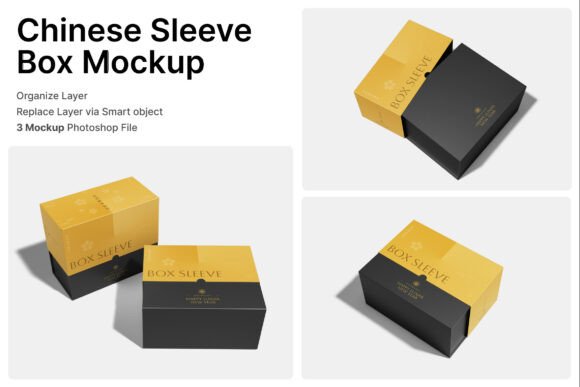
The Chinese Sleeve Box 3D Mockup is a digital asset designed to help visualizers and product designers showcase packaging in a lifelike format. It simulates the appearance of a rigid box with a sliding sleeve, commonly used in premium product packaging. The mockup includes three PSD files and a help guide, all optimized for high-resolution presentation at 4000 x 3000 pixels and 300 dpi. This ensures that the final visuals are print-ready and suitable for both digital and physical marketing materials.
At its core, the mockup leverages smart object layers—a feature in Adobe Photoshop that allows users to easily insert their own designs. By simply double-clicking a layer, placing the artwork, and saving, designers can instantly see how their packaging concepts look in a real-world context. This level of interactivity makes it ideal for presenting ideas to clients or stakeholders without the need for physical prototypes.
Applications Across Industries
The versatility of the Chinese Sleeve Box 3D Mockup makes it a valuable asset across multiple industries. Here are some of the most common applications:
- Lunar New Year Packaging: With its cultural roots, this mockup is perfect for creating festive packaging for holiday-themed products like red envelopes, candies, and decorative items.
- Tea Boxes: Tea brands often rely on elegant and culturally inspired packaging to appeal to discerning customers. This mockup allows for a refined presentation of such products.
- Confectionery Packaging: From chocolates to traditional sweets, the mockup helps designers visualize how their branding will appear on gift boxes and seasonal treats.
- Jewelry Presentation: The rigid box structure mimics the upscale packaging often used in the jewelry industry, making it a go-to for luxury accessory designers.
- Luxury Souvenirs: Whether it’s for cultural landmarks or high-end boutiques, the mockup supports the creation of premium souvenir packaging.
- Festive Hampers: Gift sets for holidays or special occasions benefit from the visual appeal and structural clarity this mockup provides.
- Oriental Branding: Brands that incorporate Eastern aesthetics or cultural motifs can use the mockup to ensure their packaging aligns with their visual identity.
- Cosmetic Gift Sets: Beauty brands launching seasonal or limited-edition collections can present their products in a polished and professional format.
- Premium Retail Packaging: From skincare to gourmet foods, the mockup supports high-end retail packaging design workflows.
- Seasonal Celebration Collections: Whether it’s for Christmas, Diwali, or Mid-Autumn Festival, this mockup adapts well to seasonal product lines.
Why Designers Choose the Chinese Sleeve Box 3D Mockup
There are several compelling reasons why the Chinese Sleeve Box 3D Mockup has become a staple in modern design workflows:
- Time Efficiency: Creating realistic packaging visuals from scratch can be time-consuming. The mockup simplifies this process, allowing designers to focus more on the creative aspects of their work.
- Cost-Effective: Physical prototypes and photoshoots can be expensive. With a digital mockup, teams can iterate quickly and affordably.
- High Visual Fidelity: The mockup’s resolution and detail ensure that the final output is of professional quality, suitable for client presentations and marketing campaigns.
- Cultural Relevance: For brands targeting Asian markets or incorporating Eastern design elements, this mockup is a culturally aligned choice.
- Easy Customization: Thanks to smart object layers, users can quickly swap out designs, textures, and graphics without compromising quality.
Integrating the Mockup into Your Workflow
Incorporating the Chinese Sleeve Box 3D Mockup into your design process is straightforward. Start by opening the PSD file in Adobe Photoshop. You’ll notice that each component of the box—such as the sleeve, lid, and base—is on a separate layer. Double-clicking the smart object layer opens a new window where you can place your design. Once saved, the design automatically updates in the 3D scene.
This functionality is especially useful for designers working on multiple variations of a product. For example, if you're creating packaging for a series of teas or a collection of cosmetics, you can reuse the same mockup and simply update the artwork for each variant. This not only speeds up the design process but also ensures consistency in presentation.
Best Practices for Using the Mockup
To get the most out of the Chinese Sleeve Box 3D Mockup, consider the following tips:
- Match Your Design to the Mockup’s Lighting: Pay attention to the light source and shadows in the original file to ensure your inserted design blends naturally.
- Use High-Resolution Graphics: Since the mockup is high resolution, your design elements should be as well to maintain clarity.
- Experiment with Color Schemes: Try different color combinations to see which ones stand out best in the 3D environment.
- Test Multiple Angles: Some mockups offer different viewing angles. If available, use these to show your packaging from various perspectives.
- Keep Branding Consistent: Ensure that fonts, logos, and color palettes align with your brand identity for a cohesive look.
Considerations When Choosing a Mockup
While the Chinese Sleeve Box 3D Mockup is a powerful tool, it’s important to evaluate whether it fits your specific project needs. Consider the following factors:
- Target Audience: Is your packaging intended for a luxury or festive market? If so, this mockup is well-suited to your needs.
- Design Complexity: If your design involves intricate patterns or textures, ensure the mockup allows for detailed customization.
- Software Compatibility: Make sure you have Adobe Photoshop or a compatible program to work with PSD files.
- Image Stock: Note that image stock is not included, so you’ll need to source any additional visuals separately.
- Project Timeline: If you're working under tight deadlines, the ease of use offered by smart object layers can be a major advantage.
Final Thoughts
In today’s fast-paced design environment, tools like the Chinese Sleeve Box 3D Mockup are essential for creating high-quality, culturally relevant packaging visuals. Whether you're designing for a holiday collection, luxury brand, or cultural product line, this mockup provides the flexibility and realism needed to impress clients and streamline your workflow. Its ease of use, combined with professional-grade output, makes it a standout choice for designers looking to elevate their packaging presentations.